
Z7 Download 2026 – Latest Z7 Game APK, Installation & Login
6.9Mb
v1.34
Android: 5.0+
56K

Description
Introduction
If you are looking for Z7 Download, you probably want a simple way to get the Z7 Game APK and understand how it works before creating an account. Finding an APK is only one part of the process. It is also important to know how to install it, how registration and login work, what types of games are available, and what to check before using payment features.
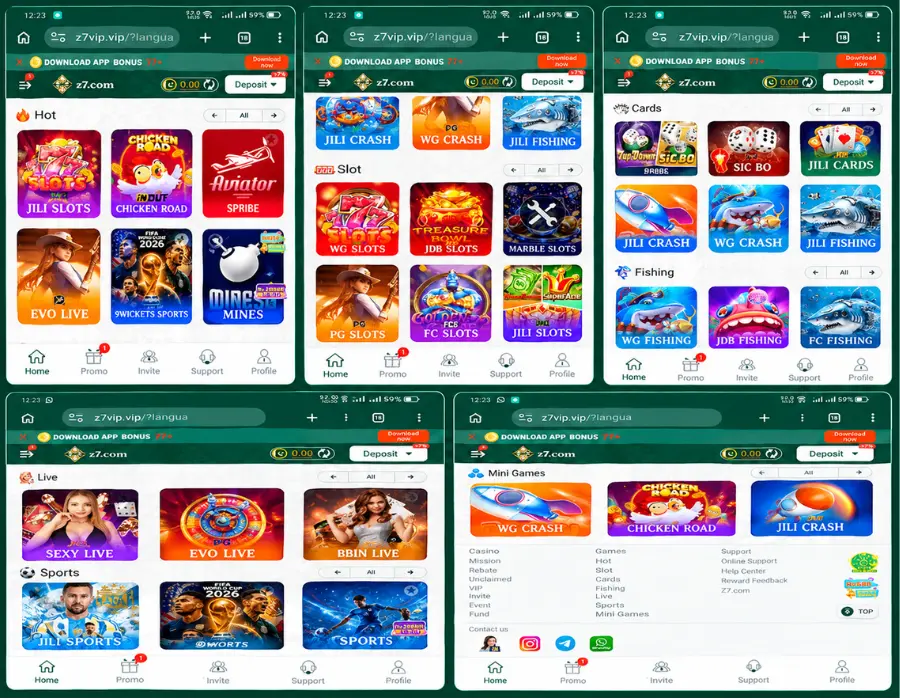
Z7 Game is an online gaming platform that brings different types of games together in one place. Depending on the current version, users may find slots, card games, fishing games, crash-style games, sports, live games, and mini-games. The available games, promotions, and payment options may change with updates, so it is always worth checking the current platform information.
In this guide, we will walk through the Z7 Download process step by step. You will also find practical information about Z7 APK installation, registration, login, payment methods, troubleshooting, and account security.
Important: Z7 includes real-money gaming features. There is no guaranteed way to make money or win. Only use these services where permitted, follow applicable age requirements, and never spend more than you can afford to lose.
What Is Z7 Game?
Z7 Game is an online gaming platform designed to give users access to several gaming categories from a single account. Instead of moving between different websites or applications, users can browse the available games through the platform’s main interface.
The selection can include different styles of games, from slot and card games to fishing, sports, live and quick-play options. The exact selection is not necessarily permanent because gaming platforms can add, remove, or update games over time.
For someone new to Z7, the best approach is to explore the available categories first and understand the rules of a game before using any real money. A familiar-looking game can still have different rules or conditions depending on the version or provider.
You may also like: BBA566 Game and UR8 Game.
Z7 Download 2026: Things to Know Before You Install
The Z7 APK is an Android application package, which means the installation process can be different from downloading an app directly from Google Play.
Android allows users to install applications from outside Google Play, but this should be done carefully. Google warns that apps from unknown sources can create security risks, and Google Play Protect checks Android applications for potentially harmful software.
That does not mean every APK from outside Google Play is automatically unsafe. It does mean you should pay attention to where the file comes from before installing it.
If you are searching for Z7 Download, check the website address carefully and avoid downloading files from random pages, pop-ups, or links sent by unknown people. A few seconds of checking the source can save you from installing the wrong application.
How to Download Z7 APK on Android
Getting the Z7 APK onto an Android phone is generally straightforward when the application is available through the intended download source.
Open the Z7 Download Page
Open your Android browser and visit the website you intend to use for Z7 Download. Check the domain carefully before continuing, especially if you found the page through a search engine.
Find the APK Download Button
Look for the main Download or Download APK option. Be careful with advertisements and pop-ups that may appear around the download button.
Start the Download
Tap the download option and wait for the APK to finish downloading. If your internet connection is unstable, allow the download to complete before trying to open the file.
Locate the APK
Once the download is complete, open your phone’s Downloads folder or Files application. Find the Z7 APK and check that it is the file you intended to download.
Install the App
Tap the APK file and follow the installation instructions shown by Android. Your phone may display a security message because the application was downloaded outside Google Play.
Open Z7
After installation, open the application and allow it to load completely. Before entering account or payment information, make sure the application behaves as expected and that you downloaded it from the source you intended to use.
How to Install Z7 APK
For most Android phones, installing an APK takes only a few steps. However, Android security settings can be different depending on the phone and operating-system version.
If your phone asks you to allow installation from the browser or file manager, take a moment to check the source before continuing. You should not disable security protections simply to install an APK that you do not trust.
A simple installation flow is:
Download Z7 APK → Open Downloads → Tap the APK → Review the Android warning → Install → Open Z7
If Android blocks the installation, there is usually a reason. The file may be incompatible, incomplete, damaged, or restricted by your phone’s security settings.
Z7 Game Registration Guide
Once Z7 is installed, new users may need to create an account before accessing account-based features.
The registration screen can vary, but you may be asked for a mobile number, password, or verification details. Follow the information requested on the current registration page rather than relying on instructions from an old version of the app.
Choose a strong password and avoid using the same password that you use for your email, social media, or banking accounts. If your mobile number is used for verification or account recovery, make sure you enter the correct number.
Most importantly, keep your login details private. Legitimate support should not need your account password or one-time verification code.
Z7 Login
If you already have an account, you can normally access it through the Login option inside the platform.
Enter the details connected to your account and complete any verification requested by the service. If the login page does not load, first check your internet connection and make sure you have entered your details correctly.
If you recently changed your password or phone number, make sure you are using the latest account information.
Never send your password, OTP, PIN, or other security codes to someone who contacts you through an unofficial WhatsApp, Telegram, Facebook, or other social-media account.
Z7 Game Categories
One of the useful things about Z7 Game is that different types of games can be found in one platform. The exact lobby can change, but users may come across several broad categories.
Slot Games
Slot games are built around reels, symbols, themes, and different game features. Some are very simple, while others include bonus rounds or additional features.
Before playing a slot, take a moment to read the information provided for that particular game. Do not assume that every slot works in exactly the same way.
Card Games
Card games offer a different type of gameplay and can include several formats and rule sets.
If you are unfamiliar with a particular card game, read its instructions before starting. Understanding the rules is especially important when real money is involved.
Fishing Games
Fishing games usually have a more arcade-style appearance. Players interact with targets or objects on the screen while the game uses its own scoring system.
Although these games can look similar to casual mobile games, real-money versions still involve financial risk.
Crash-Style Games
Crash-style games are generally fast-paced and use a changing multiplier or similar mechanic during a round.
Because rounds can move quickly, it is easy to continue playing without keeping track of spending. Setting a personal limit beforehand can help you avoid making decisions based on previous losses.
Live Games
The live section may provide games designed to feel more interactive, including table-style formats where available.
The selection can vary, so check the current lobby to see which live games are actually offered.
Sports Games
Z7 may also include sports-related gaming options. Available sports, events, and markets can change, so read the information displayed for the particular option you are considering.
Mini Games
Mini-games are generally designed around shorter and simpler gameplay. They can be easier to understand than some larger game formats, but if real money is involved, they should still be treated carefully.
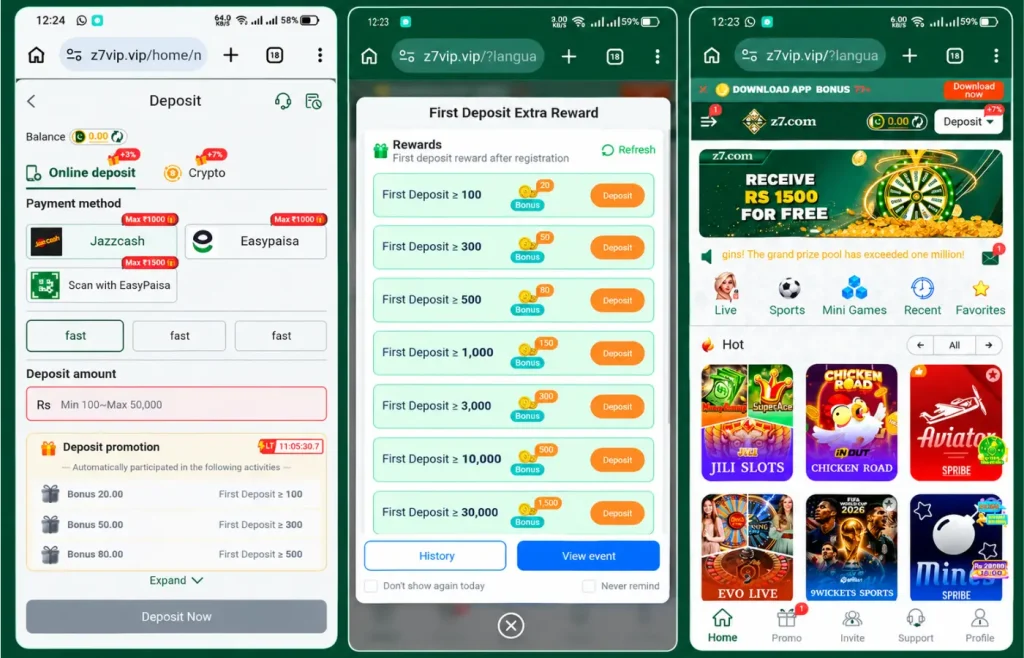
Z7 Deposit and Payment Options in Pakistan
For Pakistani users, payment options can be one of the first things they want to check before using an online gaming platform.
Depending on the current service, users may see local options such as JazzCash and Easypaisa, while other payment methods may also be available. Payment methods, limits, and requirements can change, so it is better to check the current payment section rather than relying on information from an older article.
Before making a deposit, carefully check the recipient details and the amount you are sending. If the platform provides a transaction or reference number, keep it until the payment has been properly processed.
You should also avoid sending money to a personal account simply because someone contacts you and claims to represent Z7. Use the payment method shown through the legitimate platform and verify the details before confirming the transaction.
What to Check Before a Deposit
Before adding money to your account, look at the current minimum deposit amount and available payment methods. Also check whether there are any account-verification requirements or conditions attached to the payment.
If you use JazzCash or Easypaisa, make sure the account or wallet details are correct before confirming the transaction. Never share your OTP or payment PIN with another person.
Z7 Withdrawal Information
Depositing money and withdrawing money are two different processes, and users should understand the withdrawal conditions before putting money into an account.
Depending on the current platform rules, you may need to complete account verification before requesting a withdrawal. There may also be minimum withdrawal amounts, supported payment methods, processing conditions, or other requirements.
Do not assume that every withdrawal will be processed immediately. Payment processing can depend on the platform, payment provider, account status, and verification requirements.
If you plan to use a real-money gaming service, reading the current withdrawal terms before depositing is a much better approach than checking them only after you want to withdraw.
Z7 Game Safety Tips
When downloading an APK, your phone’s security should come before convenience.
Google recommends caution when installing applications from unknown sources and provides Play Protect to help detect potentially harmful applications. Keeping Play Protect enabled is a simple extra layer of protection for your Android device.
You should also avoid modified APKs that promise unlimited balance, guaranteed winnings, unlocked VIP features, or similar offers. A modified file may not be the application you intended to install.
Before installing any APK, look at the file source and the permissions requested by the application. If something seems unusual, stop and investigate it instead of continuing automatically.
Keep Your Account Secure
Your Z7 account should be treated like any other online account.
Use a password that is difficult for other people to guess and do not reuse it on important accounts. Never share your OTP, password, PIN, or recovery information with another person.
Be especially careful if someone contacts you claiming to be support and asks for sensitive information. If you need help with an account problem, use the support option available through the platform itself.
Why Z7 APK May Not Install
Sometimes an APK downloads successfully but refuses to install. This can happen for several ordinary reasons.
Not Enough Storage
If your phone is almost full, Android may not have enough space to complete the installation. Check your storage and remove files you no longer need.
Incompatible Android Version
An APK may not work correctly with every Android device. If the application requires a newer Android version than your phone supports, installation may fail.
Damaged Download
A download interrupted by poor internet can result in a damaged file. If this happens, remove the incomplete APK and download a fresh copy from the intended source.
Android Security Restrictions
Your phone may block an installation because of its security settings. Do not immediately bypass the warning. First understand why Android is blocking the file.
Older APK Version
An older version may stop working properly after the service changes. If a newer version is available from the intended source, check whether updating resolves the problem.
Z7 Game Not Opening? Try These Fixes
If Z7 installs but does not open correctly, start with the simple solutions.
First, check your internet connection. Try switching between Wi-Fi and mobile data to see whether the problem is related to connectivity.
Next, restart your phone. Temporary Android processes can sometimes cause applications to freeze or fail to load correctly.
You can also check the available storage on your device. Very low storage can affect application performance.
If the problem continues, check whether the application has an available update. If you eventually need to reinstall it, use the intended download source rather than downloading a random copy from another website.
Is Z7 Available on Google Play?
Whether an application appears in Google Play can depend on several factors, including developer distribution, device compatibility, and country or regional availability.
Google explains that an app may not be available to a user because of country restrictions or device compatibility. Therefore, not finding an app in Google Play does not by itself explain why it is unavailable.
If you choose to install Z7 through an APK instead, remember that sideloading requires additional attention to the source and security of the file.
Z7 Download for Pakistani Android Users
Pakistani Android users should consider a few practical points before using Z7.
Payment options such as JazzCash and Easypaisa may be relevant to local users, but their availability and conditions can change. Always check the current payment page before making a transaction.
It is also important to understand the difference between an APK and the service itself. An APK is simply an Android installation file. Installing it does not automatically mean that the service is safe, legal, or profitable.
Before using a real-money gaming platform, check the rules that apply to you and make sure you meet any applicable age requirements.
How to Use Z7 Responsibly
Real-money gaming should never be treated as a guaranteed way to earn an income.
Only use money that you can afford to lose, and never use money needed for household expenses, bills, education, or other important needs. Borrowing money to gamble can also create unnecessary financial pressure.
It is equally important not to chase losses. Losing one round does not mean that the next round will recover your money.
Promotional offers should also be read carefully. A bonus may come with conditions, limits, or other requirements, so do not assume that every advertised amount is immediately available for withdrawal.
Z7 Download Checklist
Before you create an account or make a deposit, take a minute to go through this checklist:
| What to Check | Why It Matters |
|---|---|
| Download source | Helps reduce the chance of installing a fake APK |
| Android compatibility | Can prevent installation problems |
| App permissions | Helps you understand what the app can access |
| Play Protect | Adds an additional Android security check |
| Payment method | Confirms how you can add funds |
| Withdrawal rules | Helps you understand the process beforehand |
| Account security | Protects your login and personal information |
| Local requirements | Helps you understand rules that may apply to you |
| Spending limit | Helps keep real-money gaming under control |
Z7 Game Pros and Cons
| Pros | Cons |
|---|---|
| Multiple gaming categories | Real-money gaming involves financial risk |
| Android access through APK may be available | APK installation requires extra care |
| Different styles of games in one platform | Game selection can change |
| Local payment options may be available | Payment conditions can change |
| Account-based access | Account details need to be protected |
| Simple access to different game types | Results are not guaranteed |
FAQs About Z7 Download
What is Z7 Download?
Z7 Download refers to downloading the Android application associated with Z7 Game. Z7 is presented online as a gaming platform with multiple casino-style and other gaming categories.
How can I install Z7 APK?
Download the APK from the intended source, open it from your Android Downloads folder, review the security message, and follow the installation instructions if you trust the source.
Is Z7 Game available for Android?
Z7 is presented with Android APK access. However, compatibility can depend on the current APK version and the Android device being used.
Does Z7 support JazzCash and Easypaisa?
JazzCash and Easypaisa may be available as payment options, but payment methods can change. Check the current payment section of the service before making a transaction.
Is Z7 Game safe?
The safety of an APK depends partly on where it comes from and how it is installed and used. Avoid modified or suspicious APKs, keep Android security features enabled, and protect your account information.
Why is my Z7 APK not installing?
Common reasons include insufficient storage, device incompatibility, a damaged download, an outdated APK, or Android security restrictions.
Can Z7 promotions change?
Yes. Promotions, bonuses, game selections, payment methods, and other features can change. Always check the current terms before relying on a particular offer.
Final Thoughts on Z7 Download
Finding the Z7 Download is only the beginning. A better experience starts with understanding the APK installation process, keeping your account secure, checking the available games, and knowing how payments and withdrawals work before you use them.
For Pakistani Android users, local payment methods can be useful, but their availability and conditions may change. The same applies to game categories, promotions, and other platform features, so current information should always take priority over older instructions.

Most importantly, remember that installing an APK does not guarantee that the service is safe or profitable. Use a reliable download source, keep your Android security features active, protect your account details, and approach real-money gaming responsibly.
Z7 Game can offer different types of games in one place, but it should not be treated as a guaranteed income source. Play only within your limits and make informed decisions before spending any money.
Download links
How to install Z7 Download 2026 – Latest Z7 Game APK, Installation & Login APK?
1. Tap the downloaded Z7 Download 2026 – Latest Z7 Game APK, Installation & Login APK file.
2. Touch install.
3. Follow the steps on the screen.